I’ve been messing about in a lab lately with pivoting; routing your traffic through something you already own so you can get to ports and networks you shouldn’t be able to touch directly. One of the funnier outcomes is watching a Windows host look like it’s RDP’ing into itself, which sounds absurd until you line up the sockets and the PIDs.
The bit that looks weird in netstat
You’ve probably seen svchost listening on 3389 a thousand times. That’s fine. That’s Windows doing Windows things. What’s less fine is when notepad.exe shows up with an established connection to loopback RDP.
Here’s what I was looking at on the victim (domain controller in this lab):
|
|
So who’s 7064, and who’s 896?
|
|
896 listening on 3389? Normal. 7064 talking to 127.0.0.1:3389? That’s the bit that should make you go “hang on a minute”.
What I actually did to get there
This was a toy chain, but it’s the same shape you see in the wild when someone’s trying to hide where the RDP is really coming from.
- Compromise the host (scheduled task, Metasploit implant, you know the drill).
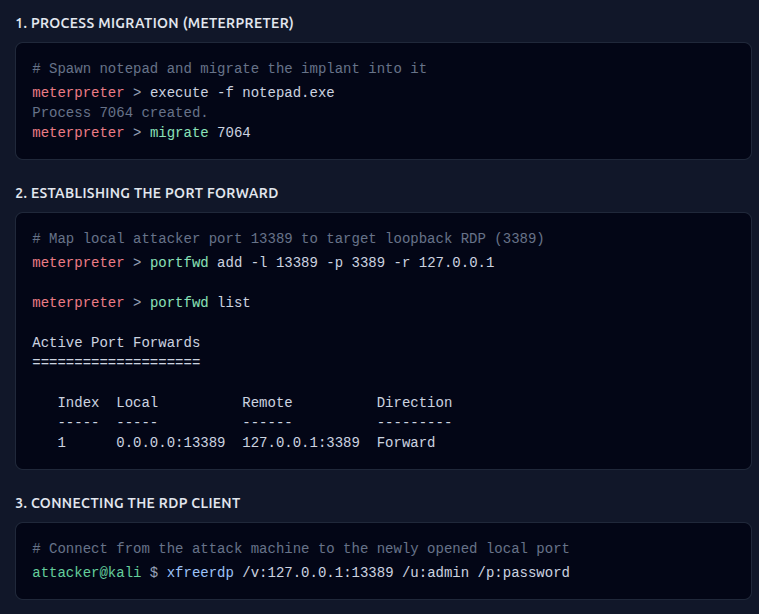
- Spawn notepad from Meterpreter, then migrate the implant into it (DLL injection / process migration; pick your favourite euphemism for “my evil code now lives in someone else’s process”).
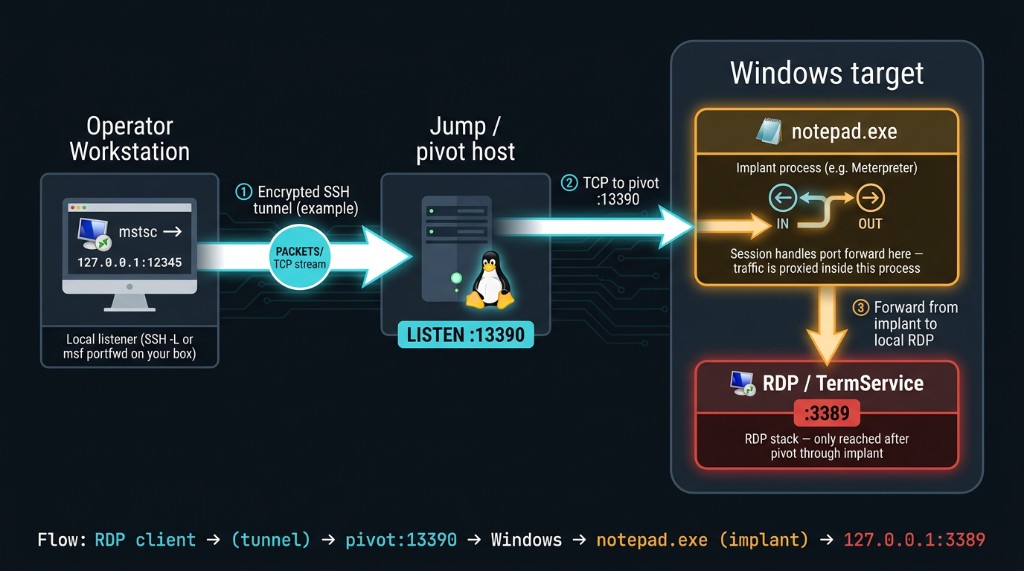
- On the attacker box, add a forward so anything I send to a local port gets tunnelled through the implant to RDP on the target. In my case that looked like:
|
|
So when I point xfreerdp (or mstsc, or whatever) at 127.0.0.1:13389 on my machine, the bytes go through Metasploit and pop out on the victim as traffic to 127.0.0.1:3389. From the DC’s point of view it can look like the machine is connecting to its own RDP stack, because that’s literally where the forward lands—even though the thing holding the client end of the weirdness is notepad.
(The flow diagram below is one of the AI generated ones—RDP client → tunnel → pivot → Windows → implant → 127.0.0.1:3389.)
Why I care about pivoting when I’m scoping an incident
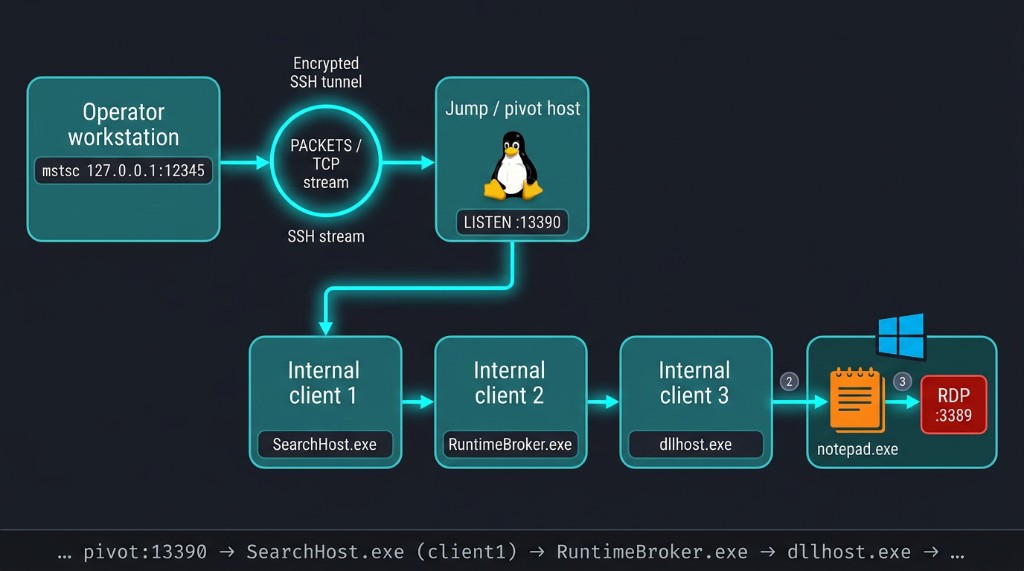
Not every compromised box gets a clean line back to C2. Sometimes you’ve got decent network controls north–south, and the operator ends up bouncing client3 → client2 → client1 → C2—a giant game of chinese whispers where each hop is a forward, a proxy, or someone reusing creds on a box they shouldn’t be on.
When that’s happening, I’m not asking “is dllhost allowed to exist?” (it is). I’m asking why dllhost (or SearchHost, or RuntimeBroker, or whatever) is talking to that host on that port, and whether that edge belongs in my mental graph of the intrusion.
The EDR miss
In the sandbox I was playing in, CrowdStrike did not log these loopback RDP connections at all. This means if you’re only leaning on whatever showed up in the console for “network”, you might miss the story entirely. I had to go deeper (think RTR / live response style work) to actually correlate the socket to the process and realise what was going on.
It did catch the process migration, which honestly tracks; EDR tends to be pretty vocal about “hey this thing jumped into notepad” compared to every weird edge case around localhost RDP.
The Metasploit sequence below shows how this can be set up on the attacker side: spawn notepad, migrate, portfwd, then RDP to the local forward:
Wrapping up
Pivoting is one of those skills that’s easy to learn in a lab and painful to spot under pressure, because the IOCs stop being “bad IP” and start being “weird relationship between two things that are both allowed in isolation”. If you’re in an IR and the network looks quiet, sketch the hops anyway. The boring old netstat / PID story still punches above its weight.